Client Auth Documentation
Client Auth is the main authentication service for either users logging into SME Connect using a CAC login method or for the Tools Gateway/Tools logging into SME Connect.
This documentation is ordered in two main ways: API Docs and Functions and Classes.
API Docs | Link to Docs
API Docs contains information about the main endpoints and services in Client Auth. This service includes only one main endpoint: JWT.
When a user is using a CAC login, or the Tools Gateway/Tools are logging into SME Connect, the user will need a valid JWT credential provided by this endpoint. This will authenticate the user's identity and allow them to then exchange it for a SME Connect service JWT.
For these users, the Client Auth is the first backend service encountered.
Outlining Complex API Processes
Logging into SME Connect | Link
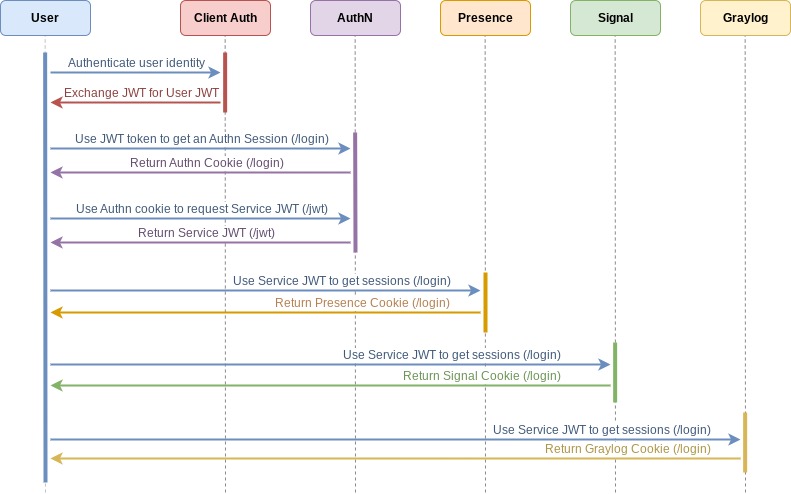
In the application's larger scope, this endpoint is called by js_common when a user is logging into SME Connect. It is the first service that is called for CAC users and for the Tools/Tools Gateway. These users are supplying the endpoint with a x509 Certificate that is then authenticated and processed. In exchange, the user receives a User JWT that will be used to authorize the user for services such as Presence, Signal, and Logging.
High-level diagram of the logging in process when a user signs into SME Connect using CAC:
SRC Directory | Link to Docs
The Client Auth src directory contains the function code for the API endpoints. The functions directory contains the source code for the echo and jwt endpoints. Supporting these two endpoints is the helpers.ts file, which contains helper functions that will process the request data from the endpoints. These functions include those that validate the x509 client authentication and process the request headers into a usable object.
Important Terminology
- CAC - Common Access Card. This is a “smart” ID card for military personnel, contractors, or DoD employees. In the backend, there is a special method and process for CAC logins.
- Cookies - 🍪 SME Connect uses HTTP cookies, or small pieces of data, to store user credentials, such as session IDs for a backend service like Presence or Signal.
- Embedded Node (EmNode) - User classification of someone using the Tools Gateway. This was the previous name used for the Tools Gateway. In Presence, the
EmbeddedNodeis a type/device. - JWT - JSON Web Token. These tokens are created/signed during the user authentication. In
Presence, aJWTendpoint is used to authenticate a user for theassetsservice. - Onsite Expert - User type of someone using an iPad
- Remote Expert - User type of someone using the Web UI
- SME - subject matter expert
- Tools Gateway - A device that connects any USB or serial-enabled tool to the iPad and the remote expert. Previously, this device was known as the “Embedded Node”, which you may still hear used. The Tools Gateway supports tools such as digital cameras, digital micrometers, digital multimeters, and optical borescope. For backend APIs, the Tools Gateway and its connected tools are each considered individual users, with the tools having a direct connection with a Tools Gateway (known as “EmNode” or “Embedded Node”).
- Websocket - A websocket enables real-time, two-way communication between a client and server. For SME Connect, socket events help communicate to users when others have joined the room, are requesting to join a room, and when users have adjusted their video/audio settings. Websockets prevent the need for having to poll the presence server for specific data (such as changes in the room's members list)
Editing the Documentation
This documentation is created using docusaurus. This website builder has been setup to combine files containing OpenAPI configurations and TypeDoc.
The documentation files can be found in the docs directory in this repository's source files. When editing these files, do not change the file names as docusaurus has been set up to find and use these file names. The following list highlights what is contained in each file and what contents should be updated/edited when updating the documentation.
- docusaurus.config.ts
- This configuration file contains the metadata and configuration settings for creating the docusaurus website. It also includes the navigation settings. If copying this repository, update only the title property with the name of the service.
- index.md
- This file is the homepage information for the documentation. If copying this repository, edit the entire contents of this file.
- indext.ts
- This file contains the entry points for
TypeDocto compile the documentation for the exported functions/classes. If editing or adding additionalTypeDoccomments to functions and classes, check that the files are included inindex.ts. If copying this repository, edit the entire contents of this file.
- This file contains the entry points for
- openapi.yaml
- This file is the
OpenAPIstandard for the service's API. It contains information about endpoint's actions, requests, and responses. When editing or adding an endpoint, edit this file to reflect any changes made. If copying this repository, edit the entire contents of this file.
- This file is the
- typedoc.json
- This file contains the
TypeDocconfiguration used to compile and generate the documentation for this repository's functions and classes. When editing this file, edit only thename.
- This file contains the
- typedocIntro.md
- This file contains the introductory information for the
TypeDocsection of the documentation. This section highlights information about the service's functions and classes used. If copying or editing this repository, edit only thenameproperty.
- This file contains the introductory information for the
- assets
- This folder contains images that can be used in the
typedocIntro.mdandindex.mdfiles. Reference a relative URL path of:img/[FILE PATH]for Docusaurus to adequately find the image.
- This folder contains images that can be used in the
Documentation Resources
To understand more about this documentation and the resources used to compile it, consult the following resources:
- Docusaurus.io - The main website compiler.
- OpenAPI - The OpenAPI standard used to create the API documentation
- TypeDoc - The TypeScript documentation generator. It uses comments in files to create documentation